
Guide
How to set mobile keybinds in Anki
Use this guide if you are reviewing on iPhone, iPad, or Android. Mobile setup starts with Switch Mode, then you finish the button mapping inside your Anki app.
iPhone / iPad / Android
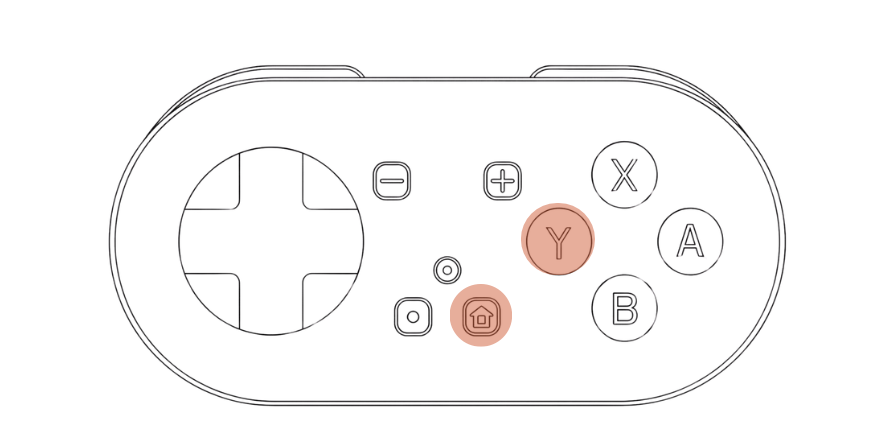
Y + Home
Blue LED
Before you start
Enter Switch Mode with Y + Home, pair over Bluetooth, and hold MODI vertically with the D-pad facing down.
- iPhone / iPad: Settings → Review → Gamepads
- Android: Settings → Controls
- LED: solid blue in Switch Mode
iPhone / iPad
How to change keybinds in AnkiMobile
If you use AnkiMobile, the keybind settings live in the review settings.
- Connect MODI in Switch Mode so the LED turns solid blue.
- Open Anki on your iPhone or iPad.
- Open Settings.
- Go to Review.
- Open Gamepads.
- Assign the actions you want and test them during review.
Android
How to change keybinds in AnkiDroid
The Android path is similar, but there is one button-label quirk worth knowing about ahead of time.
- Connect MODI in Switch Mode so the LED turns solid blue.
- Open AnkiDroid.
- Open Settings.
- Go to Controls.
- Assign the actions you want and test them during review.
- The X-Y-B-A labels can appear as Y-X-A-B while you are assigning them.
- That mismatch is cosmetic. The commands you save should still work normally after setup.